Scam With Your Friends Quota and Office Progression
Compare the current team total, quota, and review timer, then evaluate office purchases using visible descriptions without invented prices or permanent-upgrade claims.
Use the displayed target minus team total to understand the current gap, then read the review clock. Check an office item’s current price and stated effect before spending; official spending footage does not establish a complete upgrade catalog or permanent benefits.
View reference image
On this page
Manage a workday in Scam With Your Friends by checking the current team total against the displayed quota, watching the review countdown, and making office purchases only after reading their current in-game description. Do not use a promotional screenshot’s target or an old playtest’s item price as a fixed rule for every run.
The game’s Steam description confirms a daily quota, a boss review, run-based progression, and increasingly chaotic workdays. JakeHub’s official gameplay trailer describes spending earnings on office items. The planning steps below are our recommendations; they do not establish an optimal earning route, a complete upgrade catalog, or a promise that purchases persist after failure.
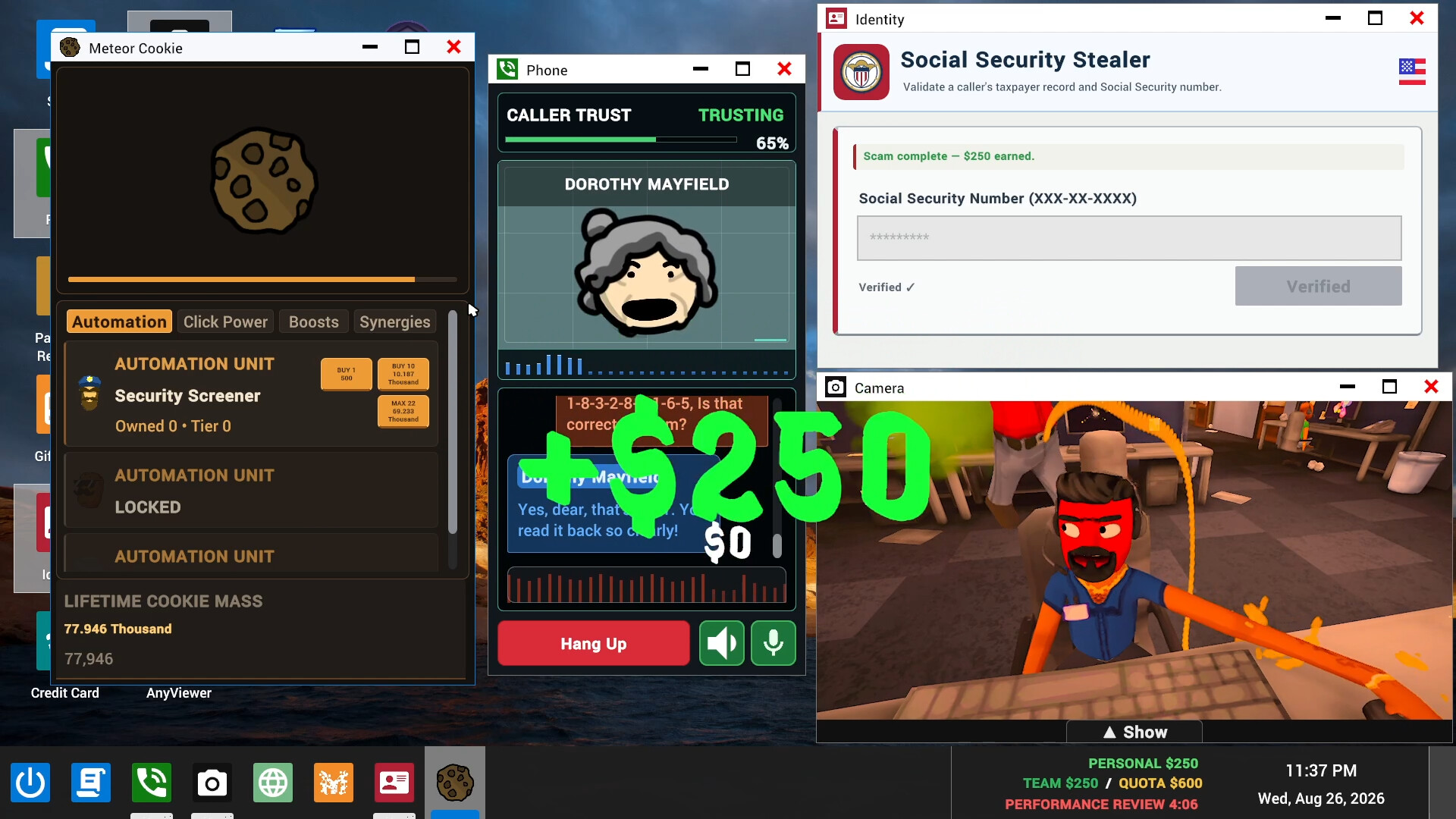
Official Steam promotional screenshot, checked 16 October 2026. Rights remain with JakeHub, Metater, Jatater Worldwide, and other respective owners. Its money values and timer belong to the illustrated game state and are not universal starting settings.
Read the current target before choosing a plan
Official screenshots distinguish personal earnings from a team total and a quota. Start with the team total and target together. A player can have made progress personally while the team remains short of the displayed goal. Likewise, a completed-looking app window should be checked against the actual score feedback before you count it in your plan.
Calculate the remaining gap using the current display: target minus current team total. If the result is zero or less, the shown target has been reached at that moment. That arithmetic is a planning aid, not a claim about hidden game conditions or the final review’s complete logic. Follow any additional instructions the current game presents.
For example, a hypothetical target of 1,000 and a team total of 650 leave a gap of 350. These numbers illustrate subtraction only; they are not a verified quota for a particular day. Use the values your own run shows, and recheck them when the day advances or the interface changes.
Use the review clock to prioritize attention
The official interface includes a performance-review countdown. Read that alongside the remaining gap. A group with plenty of time can afford a different learning pace from a group approaching review while still short. The useful decision is what to pay attention to next, not a claim that the game follows a fixed earnings-per-minute formula.
If the review is approaching, close out avoidable confusion: restore a readable score panel, identify the active game interaction, and stop opening unfamiliar optional apps merely to see what they do. That reduces attention lost to the desktop without providing any instructions for real-world deception.
Do not treat the clock as proof that every app action takes a predictable duration. The developer describes real-time AI conversations, and Steam lists workplace disasters that can interrupt the flow. A plan should tolerate uncertainty rather than promise that a particular number of interactions always fits before review.
Separate progress, unlocks, and purchases
The Steam description says the range of fictional scenarios expands as days progress. That establishes a progression loop, but it does not document an exact day-by-day unlock table in the reviewed material. When the game presents something new, read its current explanation before assuming it replaces the previous option or is automatically more efficient.
The official trailer also describes buying office items with earnings. An item purchase, a scenario unlock, and an improvement to a numerical stat are different claims. We have not verified that every purchasable object is a permanent upgrade, or that every object improves earnings. Do not call a decoration a productivity upgrade unless its current description and behavior support that label.
When comparing purchases, record the visible item name, price, stated effect, and the balance the purchase would leave. If the interface does not explain an effect clearly, treat that uncertainty as part of the choice. A known cosmetic preference is a different reason to spend from a confirmed mechanical benefit; either can be enjoyable, but they should not be confused.
Make one purchase decision you can evaluate
Before buying, ask what problem the purchase is meant to solve in this run. Is the group trying a newly available game feature, personalizing the office, or following an explicit objective? If nobody can explain the purpose, wait until the current workday is under control rather than spending because a button is available.
If you do buy something, note the current balance and the effect you expect based on the description. Then observe the result without changing several other things at once. This does not require a spreadsheet for a comedy game; a short comparison simply prevents a group from attributing every improvement to the most recent purchase.
We have not verified refund rules, which balances are shared for every purchase, or all persistence behavior across failed runs and updates. Confirm those details in the current interface before allowing one player to spend on behalf of the group. Do not promise that leaving a lobby or restarting will preserve a purchase without evidence.
Diagnose why a quota was missed
The official description and screenshots make clear that failure to reach a daily quota can lead to being fired. Read the actual review result before deciding why it happened. The same shortfall could follow an unreadable desktop, unclear turn-taking, a long interruption, or an incomplete understanding of a current objective.
Use a short review with three observations: the last team total you remember seeing, the remaining time when the group noticed trouble, and the main source of lost attention. Then choose one change for the next attempt. If several explanations are possible, do not pretend the result proves a particular mechanic or item is broken.
| What you observed | What it suggests checking | What it does not prove |
|---|---|---|
| Personal earnings rose but team remained short | Read team total and target together | A fixed quota or universal reward value |
| Review arrived during confusion | Improve countdown awareness | A hidden penalty for using one app |
| A purchase did not produce an obvious benefit | Re-read the stated effect and purpose | That every office item is an earnings upgrade |
| A disaster interrupted the day | Restore the current task and score view | A predictable event schedule |
Plan the next day from its actual state
When the game advances, read the new target and available options again. Run-based progression and growing chaos mean yesterday’s mental picture may no longer describe the current screen. The reviewed sources do not justify a universal formula for quota scaling, so this guide does not invent one.
If you are playing co-op, agree on one brief status check at the start of the new day. Confirm the displayed target, who is watching the clock, and whether anybody intends to explore a new purchase or feature. These are group conventions, not mandatory role assignments in the game.
The co-op teamwork guide helps when the main issue is overlapping communication. The beginner guide helps when players still cannot recognize the desktop loop. Returning to the relevant problem is more useful than applying a generic instruction to earn faster.
Keep playtest offers and current release rules separate
The developer website advertises an unlimited-AI-credit offer for the playtest only. That wording should not be expanded into a promise about every release account or session. Check current purchase information and in-game messaging if an allowance affects your plans; we have not established a universal release entitlement here.
A current complete item catalog, exact quota schedule, permanent-upgrade list, and reliable reset rules remain factual gaps. We will add them only with dated evidence from the relevant build. Until then, the reliable method is to read the current target, make the desktop understandable, choose purchases deliberately, and compare the game’s actual review result.
Step-by-step guide
- Read the current gap
Compare the actual team total with the displayed target and recheck when the day changes.
- Choose a purchase for a reason
Read the current item description, price, and remaining balance without assuming every purchase improves earnings.
- Use review feedback
Compare the result with the last visible state and change one coordination habit for the next attempt.
Video evidence
Watch creator walkthroughs alongside this guide. Check the recording date before following requirements that may have changed.
SCAM WITH YOUR FRIENDS - Official Gameplay Trailer - Run a Scam Call Center
Official developer gameplay trailer linked by Jatater Worldwide: fictional office, daily quota, spending, and boss reviews.
Sources
Recheck these links whenever the game version, release status, or strategy changes.
- Steam: exact game listing Identity, Early Access, solo/co-op modes, run progression, and official screenshots.
- Jatater Worldwide: official game page Fictional AI callers, daily quota, office presentation, trailer, and playtest-only offer wording.
- SCAM WITH YOUR FRIENDS - Official Gameplay Trailer - Run a Scam Call Center Official developer gameplay trailer linked by Jatater Worldwide: fictional office, daily quota, spending, and boss reviews.
- Scam With Your Friends (Without My Friends) Specific September playtest footage from Qwilzxy. It helps recognize the desktop and pace, but does not establish unchanged release-build rules.