Scam With Your Friends Co-op Teamwork Guide
Coordinate game audio, turn-taking, quota awareness, and office interruptions in Scam With Your Friends without inventing player limits or formal character roles.
Agree who handles the current game interaction, rotate responsibility for the review clock, and report visible state changes briefly. These are player coordination habits, not official classes, fixed player counts, or scripts for the fictional caller scenario.
View reference image
On this page
The most useful co-op improvement in Scam With Your Friends is a shared understanding of the current game state: who is using the active conversation, what the team target says, and when the next review is approaching. A little turn-taking makes the game’s office chaos easier to follow without removing its comedy.
This is a guide to playing a fictional multiplayer game. It covers lobby readiness, voice coordination, interface awareness, and reviewing a run. It does not teach real-world deception, information theft, or computer intrusion. The role suggestions below are player-created conventions, not official classes or unlockable jobs in the game.
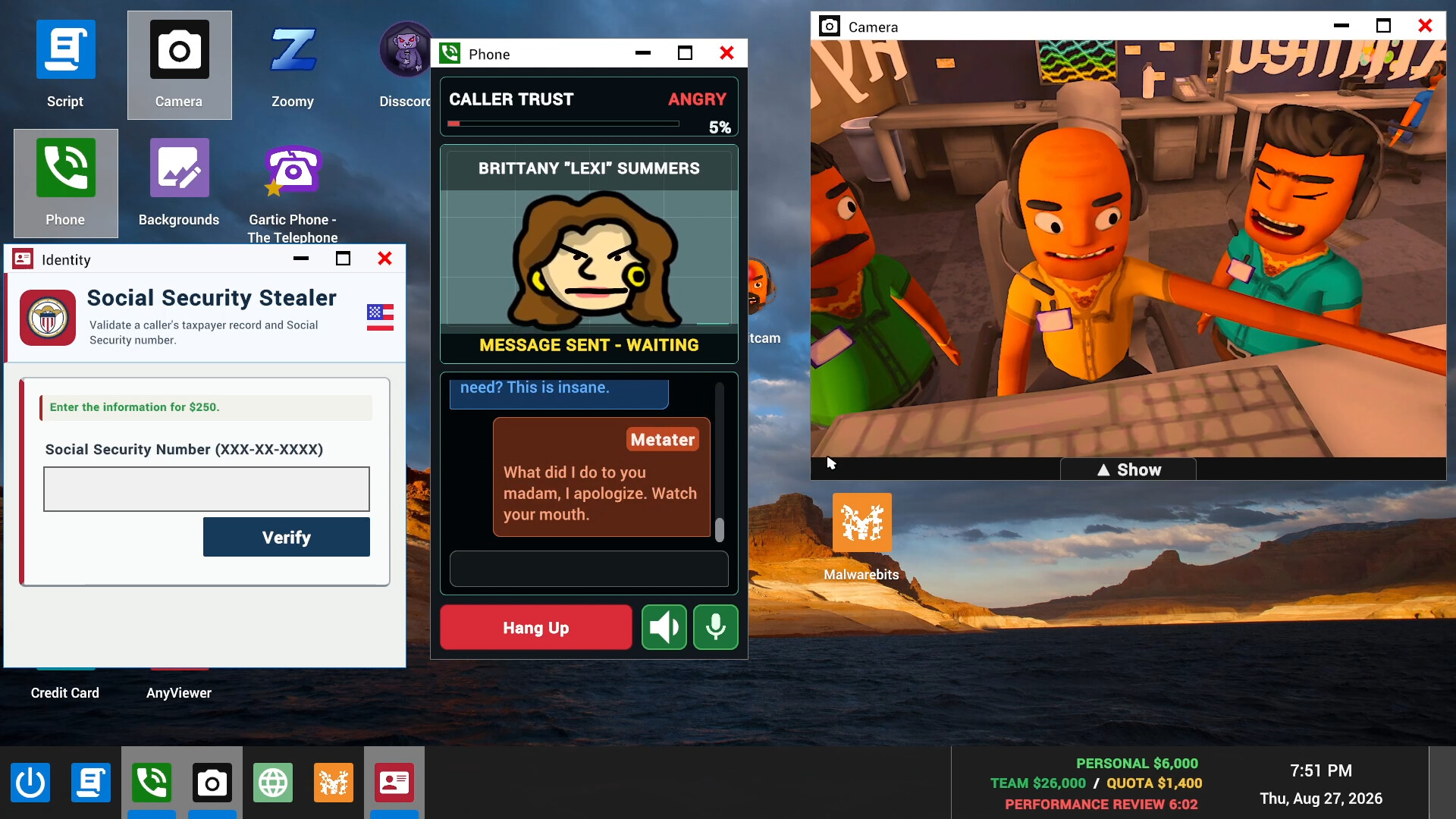
Official Steam promotional screenshot, checked 16 October 2026. Assets belong to their respective creators, including JakeHub, Metater, and Jatater Worldwide. The image is evidence of the game’s presentation, not a record of our own session.
Establish a common starting point
The Steam listing supports online co-op with friends or public lobbies, as well as single-player. It does not supply every connection or invitation step in the short feature description. Let the host follow the current lobby prompts and make sure the rest of the group understands which session it is joining. Do not assume an old video’s menu sequence is still exact.
Before the workday becomes busy, confirm that players can hear ordinary speech and recognize basic game feedback. If someone is silent, distinguish a player-audio problem from an in-game waiting state. Read the available microphone and audio settings instead of guessing a keyboard shortcut. A visible microphone icon does not prove one universal input binding.
Agree on the session’s goal. A group learning the desktop should expect a different pace from a group revisiting a familiar loop. Saying that the first run is for learning gives players room to ask what a window means without feeling that they are delaying an optimization attempt.
Use lightweight responsibilities, not rigid invented roles
Our suggested coordination pattern has three responsibilities: the player handling the current game interaction, a teammate watching team progress and the review clock, and someone noticing an office interruption. These are attention-sharing tasks, not a claim that the game formally assigns those roles or requires three players.
With fewer players, combine responsibilities. With more players, avoid having everyone report the same counter simultaneously. Rotate the watcher after a run so one person is not permanently stuck narrating the interface while others explore. The right arrangement is the one your current group can remember without a separate management system.
Use short state reports. Tell the group that the current interaction is still waiting, that the score has visibly changed, or that the review timer needs attention. This keeps communication tied to observable game feedback. Do not turn the guide into scripts for manipulating the AI characters; that is outside the teamwork problem being solved here.
Give one conversation enough space to be understood
The developer describes real-time conversations with fictional AI callers. When several players speak over each other, the group can lose track of who is addressing the game and who is speaking to teammates. Agree on a simple turn-taking signal before the session gets loud. This is a communication preference, not a verified engine requirement.
If the active player asks for quiet, let them finish the current game interaction. Use a brief status message for something urgent, such as an approaching review or an office event, rather than a competing stream of commentary. Afterward, check the game feedback together so everyone knows whether the task is complete or still waiting.
Do not assume a completed spoken exchange automatically changes earnings. The official screenshots show separate score and quota displays. Let the player watching those displays confirm the visible result. That prevents arguments based on what somebody thought happened while another window or animation covered the actual state.
Keep important windows and counters readable
The desktop-style interface can place several app windows on screen at once. The official screenshots show a phone panel, a camera view of the office, and other apps sharing limited space. Coordinate around the screen each player actually sees; do not assume every teammate has the same window arrangement or is looking at the same counter.
When reporting a problem, identify the app or display by its visible label and describe the state. A covered panel, a waiting message, a countdown, and an office event are different situations. The group can then decide whether to finish the current interaction, restore a useful view, or simply wait for a transition.
Keep optional apps out of the way during a learning attempt. Steam lists paint, recording, and camera features as part of the game’s toolbox, but the source does not say all are mandatory for every workday. Explore one unfamiliar feature at a time, then return to the quota loop so you can explain whether it helped or merely distracted you.
Recover from chaos with a small reset
The current Steam description includes computer viruses, police raids, air strikes, and other workplace disasters. This guide does not claim a fixed event schedule or a universal counter to every disaster. When one appears, first identify the current game feedback and what the tutorial or interface asks you to do.
After the immediate interruption, restore shared awareness. Check the team total, target, and review countdown again. Say who is taking the next interaction so players do not all restart at once. This short reset is an editorial coordination suggestion, not a special game command or a guarantee that every interrupted task can be recovered.
If a genuine connection problem prevents a player from continuing, use the current host and lobby options carefully. We have not verified a reconnect guarantee or every save-persistence behavior. Do not recommend deleting game data or promising that a rejoin restores all state without evidence from the current build.
Review one workday without blaming a teammate
Read the review result first. Then compare it with the team’s observations. If the quota was missed, ask whether progress was visible, whether somebody called out the remaining time, and whether a preventable interface problem repeatedly consumed attention. A useful review identifies one change the group can test next time.
| Observed problem | Team adjustment to try | What to check next run |
|---|---|---|
| Nobody noticed the approaching review | Assign a rotating clock watcher | The group hears a brief warning in time |
| Several people addressed the game together | Agree on a turn-taking signal | The active interaction remains understandable |
| Players disagreed about earnings | Confirm the visible team counter after a result | Reports refer to the same displayed total |
| Too many unfamiliar apps were open | Explore one extra tool at a time | Important panels remain readable |
Avoid changing all four habits at once. Choose the problem that most clearly affected the last attempt. A controlled change makes it easier to tell whether the group is improving or merely having a different kind of chaotic day.
Public lobbies and recordings
For public sessions, keep communication focused on the game and respect other players’ willingness to participate. The game includes an in-game recording feature according to Steam, but the presence of that feature is not permission to publish another player’s voice or personal information. Ask the people involved before sharing a session recording.
For the first-session interface, return to the beginner guide. For quota pacing and in-game purchases, use the office progression guide. Exact player limits, formal role systems, reconnect behavior, and build-specific audio fixes remain unverified rather than invented here.
Step-by-step guide
- Agree on a learning goal
Follow current lobby prompts and test ordinary game audio before the office becomes busy.
- Share attention clearly
Let one interaction remain understandable while another player watches visible team progress.
- Reset after an interruption
Restore the score view, check the countdown, and identify the next active player.
Video evidence
Watch creator walkthroughs alongside this guide. Check the recording date before following requirements that may have changed.
Scam With Your Friends (Without My Friends)
Specific September playtest footage from Qwilzxy. It helps recognize the desktop and pace, but does not establish unchanged release-build rules.
Sources
Recheck these links whenever the game version, release status, or strategy changes.
- Steam: exact game listing Identity, Early Access, solo/co-op modes, run progression, and official screenshots.
- Jatater Worldwide: official game page Fictional AI callers, daily quota, office presentation, trailer, and playtest-only offer wording.
- SCAM WITH YOUR FRIENDS - Official Gameplay Trailer - Run a Scam Call Center Official developer gameplay trailer linked by Jatater Worldwide: fictional office, daily quota, spending, and boss reviews.
- Scam With Your Friends (Without My Friends) Specific September playtest footage from Qwilzxy. It helps recognize the desktop and pace, but does not establish unchanged release-build rules.